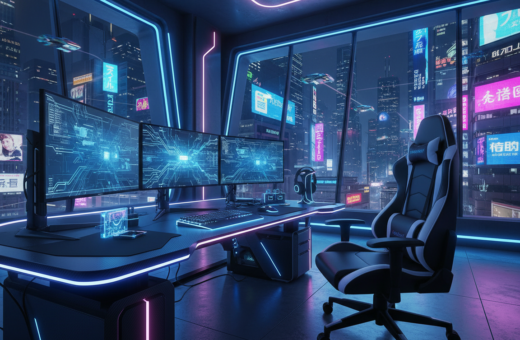
He moved away from harsh white bulbs and rebuilt the station with colorful lighting. The change started with a single LED strip behind a dual 27-inch monitor setup. That small tweak led to a bigger redesign of the gaming setup.
He tested trusted brands like Corsair and Govee to find strips that would sync with games and run all night. The new scheme made the desk feel professional and the space more immersive. Colors now pulse with gameplay and lift the mood during long sessions.
Key benefits were clear: better contrast on screens, less eye fatigue, and a more personal design. Simple ideas, like backlighting the monitors, proved powerful. For many gamers, this lighting upgrade boosts the gaming experience without new hardware.
The Benefits of Transitioning to an RGB Gamer Room
Introducing colored bias lighting behind his monitor cut glare and boosted immersion during late-night matches. Bias lighting produces a gentle glow that improves contrast between the screen and surrounding walls. This simple change helps reduce eye strain and makes long gaming sessions easier on the eyes.
- Installing accent lighting behind a monitor balances screen brightness and reduces eye strain.
- Using led strip lights on the ceiling or floor creates a cohesive atmosphere and makes the space feel larger.
- Setting a color temperature near 6500K aligns with most monitors and limits visual fatigue during long sessions.
Reducing Eye Strain and Fatigue
Proper lighting protects vision and supports extended play. He chose softer tones for downtime and brighter, cooler hues for focused gameplay.
Creating an Immersive Atmosphere
Thoughtful accent choices deepen immersion. The right colors complement furniture and enhance the gaming experience without distracting from the game.
Planning Your Lighting Layout and Design
Start by mapping where light will fall and how it will shape each corner of the gaming space. He measures the floor and walls first, leaving about one meter between the desk and other furniture to keep movement easy and safe.
Consider the room’s architecture. Windows, fireplaces, or angled walls change where led light strips will work best. Use strips to highlight features or to create a uniform glow across a wall.
He sketches ideas on paper to visualize the final design. This step makes it easier to choose options like ceiling fixtures, under-desk strips, or subtle floor accents without buying extra gear.
“A good layout balances task lighting with decorative accents so lights enhance the monitor without creating glare.”
- Create a floor plan with one meter of clearance around furniture.
- Factor in natural architecture when placing led light strips.
- Measure precisely to avoid dark spots and to cover the entire setup.
- Choose colors that blend with existing design to protect the eye and boost atmosphere.
Essential Installation Techniques for LED Strips
A clean installation makes the difference between a DIY setup and a professional-looking lighting layout. Proper choices in hardware, mounting, and cable routing will reduce glare, cut down eye strain, and keep the desk area tidy.
Selecting Quality LED Components
He looks for addressable panels and strips that match his controller to avoid flicker and color mismatch. Addressable Twinkly Squares are recommended for creative wall panels that add visual depth to a gaming room.
Mounting for Optimal Diffusion
To soften harsh beams, mount led strips in aluminum channels and fit a frosted lens. This cuts glare on the monitor and makes colors blend smoothly across walls and ceiling.
Managing Cables for a Clean Aesthetic
Plan cable runs before sticking anything down. Use clips, conduits, or raceways behind the desk to hide wires and secure strips to prevent them from falling.
“Good cable management is as important as choosing the right lights.”
- Mount strips in channels with frosted covers for even diffusion.
- Use Twinkly Squares for custom panels and high-tech accents.
- Hide cables with clips or conduits to keep the gaming space neat.
For a full how-to and product suggestions, see the gaming setup guide.
Optimizing Your Setup for an Immersive Experience
He tuned the setup so lights reacted to game events and music, turning passive décor into active feedback.
Syncing lights with audio and gameplay brings the gaming space to life. Using Twinkly with Razer Chroma lets the system mimic on-screen action. Omen Light Studio offers pixel-level control for precise effects.
He places led strips behind the monitor and under the desk to build a glowing station. Wall panels and shelves get accent lighting that pulses with music and in-game cues.
How to set it up
- Connect Twinkly or other lights to Razer Chroma to react to events and audio.
- Use Omen Light Studio for per-pixel mapping on strips and panels.
- Add a microphone controller or music dongle so lights sync to game soundtracks and voice chat.
“When lights match the action, the atmosphere and immersion improve dramatically.”
Keeping software integrated with the PC ensures the best results. Small tweaks to color and timing make sessions feel cinematic and raise the overall gaming experience.
Conclusion
A well-planned lighting upgrade can turn a basic setup into a focused, comfortable play space.
Transitioning to an RGB setup improved his gaming experience and eased eye strain. By choosing quality LED components and mapping the layout, he achieved a professional look that minimizes glare on the monitor.
Good design balances form and function. Accent lights and strips lift the aesthetic while supporting longer sessions and clearer contrast. Try different colors and sync options to find the vibe that fits your setup.
For product tips and placement ideas, see this guide on what kind of lights do you need for a gaming.