The author had just finished a 5,000-word blog post about Star Wars when a failed console impulse led to a new project. A cheap NES Classic introduced noticeable lag, and that ruined the feel of classic games.
This article explained a clear path to better play. By avoiding common emulators and leaning on FPGA hardware, the project aimed to recreate original systems with no input delay.
Readers learned how to organize controllers, pick favorite games, and keep living rooms tidy. The guide showed a practical way to gain access to classic systems that feel authentic.
Key benefits included responsive controls, a clean aesthetic, and the fact that anyone could follow the steps. The section sets up a hands-on, professional guide for players who value feeling like the original game hardware did.
Defining the Minimalist Retro Gaming Vision
They aimed to balance authentic play with a living space that stayed welcoming to everyone.
The project focused on delivering an authentic experience without the elitist rules often found in collector circles.
Instead of insisting on an old CRT or a full arcade cabinet, the plan favored compact systems and FPGA hardware. This gave access to classic systems while keeping the room tidy.
The approach prioritized high-quality controllers and hardware that recreate original timing. That way, players get the feel of original consoles without piles of cartridges.
- Replace bulky displays with modern alternatives that preserve pixel integrity.
- Choose controllers that match original ergonomics and responsiveness.
- Use FPGA or low-latency devices to avoid emulation quirks.
In short, this is a practical way to enjoy retro games while keeping a clean, modern living room that welcomes family and friends.
Why a Minimal Retro Gaming Setup Matters
A compact, modern console can give full access to classic libraries without the clutter of cartridges.
The author avoided a costly collecting project. Complete runs for systems like the Super Nintendo often cost hundreds of dollars. That price made physical collecting impractical for many players.
Using current hardware and careful design keeps the living room welcoming. A clean, black-themed device blends with TVs and sound bars. Guests see a modern piece of electronics, not a pile of old boxes.
Simplifying the game area also reduces maintenance. Fewer cables, no cartridge swapping, and clear storage mean more time playing and less time fiddling. This way, controllers and systems are ready to use when friends arrive.
- Space saving: whole libraries on one device.
- Cost effective: avoids expensive cartridge hunts.
- Social: easier to share games without technical barriers.
In short, this approach provides a seamless experience that honors classic play while fitting modern living rooms. It keeps the focus on good games, reliable controllers, and enjoyable sessions.
Selecting Hardware for Your Retro Gaming Setup
Choosing the right hardware defines how faithfully old titles will play on modern displays. This section helps readers weigh original consoles against modern clones and pick essential systems that deliver low lag and crisp HDMI output.
Original Hardware vs. Modern Clones
Original consoles can be authentic but often need adapters to work with HDMI TVs. They can also introduce signal issues and extra latency without proper conversion.
FPGA-based products avoid those problems. Devices that use an FPGA reproduce console logic in hardware, not software, so they reduce emulation errors and input lag.
Selecting Essential Systems
When choosing systems, make sure to prioritize FPGA devices and high-quality flash carts. Consider these real-world options:
- The Super Nt (about $189.99) offers a lag-free play experience for Super Nintendo titles.
- The SD2SNES Pro flash cart (~$204.99) includes an FPGA chip and broad compatibility for games like Super Metroid.
- The retroUSB AVS ($185.00) is an FPGA-powered NES alternative with HDMI and perfect integer scaling.
In short, selecting hardware that relies on FPGA rather than emulation is the clearest way to preserve timing and feel.
The Role of FPGA Technology in Modern Displays
FPGA chips bring classic consoles to modern screens by reproducing original hardware logic in silicon. This approach updates the behavior of original chips via software, so systems emulate the real timing and response of older consoles.
Unlike software emulators, an FPGA-based device removes the common input lag. Players get immediate controls and frames that match the original game feel.
Why it matters: FPGA devices let Super Nintendo, Sega Genesis, and Game Boy titles output clean signals over HDMI. The chip handles scaling to keep pixels sharp and avoids interpolation blur that modern TVs often add.
“FPGA technology gives this project the reliability and accuracy needed to preserve classic play on modern displays.”
- Zero-lag hardware replication for authentic play.
- High-quality scaling that honors CRT timing and pixel shapes.
- Future-proof access to entire classic libraries without aging original hardware.
In short, integrating FPGA into your systems is the clearest way to bridge vintage titles and modern screens while keeping controllers and displays responsive and true to the source.
Optimizing Your Display for Pixel Perfect Output
A modern display must be tuned carefully to preserve the crisp edges and timing of classic titles. Good scaling keeps each original pixel sharp and prevents shimmer on high-resolution screens.
Understanding Integer Scaling
Integer scaling multiplies each source pixel into a grid of identical pixels. This avoids fractional resizing that causes blur. The NES resolution of 256×240 needs integer scaling to stay true on a 4K monitor.
For detailed technical background, see integer scaling explained.
Avoiding Interpolation Blur
Disable any horizontal and vertical smoothing on the display. Interpolation blends pixels and softens the image, which ruins the look of Super Nintendo, Game Boy, and other classic games.
Use an HDMI connection from an FPGA-based console to keep the signal clean and avoid artifacts common with emulators or low-quality converters.
Managing Aspect Ratios
Pick a display mode that preserves the original aspect ratio. Stretching or odd zoom levels introduce visual distortion and can add input lag.
- Choose 4K when possible — it often allows exact integer multiples for 256×240.
- Enable game mode to reduce lag during fast play.
- Keep controllers responsive by combining low-latency HDMI and an FPGA chip in the systems used.
Managing Your Game Library Without Physical Clutter
A tidy digital library keeps favorite titles at hand and removes the need to hunt through boxes of carts.
Flash carts let users store thousands of games on a single microSD card. The Super Nintendo library, for example, fits easily on modern cards and grants instant access to classics like Super Metroid and Mega Man X.
The SD2SNES Pro shows how a flash cart can use an FPGA chip to support games with extra hardware needs. That preserves accuracy while avoiding extra lag.
This method works with original hardware and FPGA-based consoles. It offers a clean way to keep a living room orderly and still enjoy every title across NES Classic, Sega Genesis, and Game Boy systems.
- Less clutter: thousands of titles on one card.
- Fast access: switch games in seconds without handling cartridges.
- Authentic play: flash carts pair with real consoles and avoid relying on emulators.
In short, using flash carts is a practical way to maintain a neat collection while keeping full access to classic games and controllers.
Integrating Consoles into a Modern Living Room
A living room that houses consoles should feel like a lounge, not a workshop.
Careful placement and finishes make consoles blend into an entertainment area while keeping games and gear ready to use.
Hidden Storage Techniques
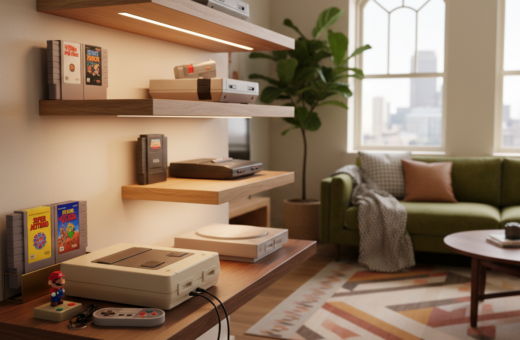
Use a black entertainment cabinet to conceal devices and match other AV components. The author painted a retroUSB AVS matte black to fit a modern cabinet and it vanished into the media shelf.
Prefer wireless controllers to remove long cables across the floor. Drawers and small bins tucked in the cabinet keep spare controllers charged and out of sight.
- HDMI switch: Manage multiple consoles without swapping cords.
- Drawer storage: Store controllers, dongles, and adapters for quick access.
- Ventilation: Leave space for airflow to avoid heat build-up.
The project shows a simple way to keep access to systems like Game Boy and Super Nintendo while avoiding the feel of a collection room.
“Hidden storage keeps the living room tidy and makes the console experience feel professional.”
Choosing Controllers That Maintain the Original Feel
Choosing a controller shapes how every jump, dash, or parry feels on screen. A good pad bridges the gap between modern convenience and the tactile feel of older consoles.
The 8BitDo SN30 Gamepad ($39.99) is a standout wireless controller that mimics the feel of the Super Nintendo pad. It delivers familiar button travel and precise D-pad input for classic games.
Practical tips:
- Select high-quality replicas to avoid input lag and short lifespan.
- Use magnetic charging cables to keep controllers charged without hunting for cords.
- Pick options with a dedicated chip for stable wireless connections during fast play.
For arcade-style titles, choose robust controllers built for durability and quick response. Fans of the Game Boy or Sega Genesis can find modern pads that retain original ergonomics while adding wireless convenience.
“Investing in good controllers is a small price for better play and longer life.”
In short, the right controllers keep games feeling authentic while making the whole gaming setup more enjoyable and ready to use.
Power and Cable Management Solutions
Managing power and cords turns multiple devices into a single, usable system. Good cable planning keeps the entertainment area tidy and makes consoles easy to reach when friends arrive.
Magnetic Charging Cables
Magnetic charging cables simplify keeping each controller charged. A dedicated magnetic adapter for every controller creates a consistent home for wireless controller batteries.
Benefits: fast docking, less wear on ports, and obvious placement so anyone can pick up a controller and play.
Concealing Power Strips
Concealing power strips inside an entertainment cabinet hides bulk and reduces trip hazards. Use a ventilated box or a mounted surge strip to protect devices and keep airflow around every console and chip.
Combine an HDMI switch with hidden power to reduce visible cords. This solution lowers clutter without changing performance or introducing lag.
“A clean power plan makes the whole system easier to use and maintain.”
- Keep one charging spot per controller to limit cable mess.
- Use quality products to protect consoles and other devices.
- Label cords for easy swaps and faster troubleshooting.
Balancing Nostalgia with Modern Aesthetics
Design choices let nostalgia and contemporary decor coexist without visual conflict.
The author used a black-themed approach so consoles and controllers blend with a living room. This keeps classic systems subtle and presentable.
The goal was to enjoy games like Super Nintendo and Game Boy titles without turning the house into a museum. A neat cabinet or shelf replaces the need for an arcade cabinet or CRT display.
Key advantages:
- It keeps a single way to play retro game libraries while avoiding cartridge clutter.
- Controllers stay charged and hidden, so friends can grab a controller and play instantly.
- The NES Classic and similar devices can be customized to match other AV gear.
“This project proves you can honor classic play while respecting modern design.”
In short, a thoughtful setup invites more play by staying tidy, ready, and stylish in everyday living spaces.
Enhancing the Experience with Authentic Sound
Clear, accurate sound is as vital to classic games as the frame rate and pixel edges. Audio mismatches can pull players out of the moment and make every song or effect feel off.
Audio output considerations include the hardware path and the quality of conversion from the console to the TV or speaker system.
Audio Output Considerations
The author avoided software emulators because many altered tones and timing, introducing noticeable lag and tonal errors that changed how a game felt.
- FPGA-based consoles reproduce original audio behavior, keeping music and effects true to the source.
- Use a high-quality HDMI connection to carry sound cleanly to the TV or receiver.
- A dedicated audio chip in a console or flash cart can restore detail lost by generic converters.
- Optimize TV or amp settings and consider a modest soundbar or receiver for richer, accurate playback.
“Never settle for poor sound — it is a core part of the play experience.”
Good audio completes the gaming experience and makes old songs and effects feel as vivid as they once were.
Ergonomic Considerations for Long Gaming Sessions
They recommended arranging the play area so long sessions stayed comfortable and pain-free. A good gaming setup started with a supportive chair and plain rules about posture.
Choose a chair that supports the lower back. Sit so feet rest flat and the spine keeps a natural curve.
Position the monitor at eye level. That prevents neck strain and keeps attention on the screen during long play.
- Use a wireless controller to sit naturally and avoid leaning forward.
- Take short breaks every 45–60 minutes to stretch and reset.
- When holding a Game Boy, change hand positions and rest wrists often.
Players should make sure controllers are charged and within reach to reduce awkward reaches. Small changes like armrests, lumbar support, and a footrest improved long-term comfort.
Ergonomic care kept the focus on the game and the joy of classic games without physical cost. Good posture and sensible breaks made lengthy gaming sessions sustainable and enjoyable.
Troubleshooting Common Display and Lag Issues
A crisp image and prompt controls are achievable; troubleshooting begins with the HDMI path and display choices. Addressing these problems early keeps long gaming sessions smooth and preserves the feel of classic titles.
Addressing Input Lag
Input lag is the most common issue in retro gaming and often stems from software emulators or improper TV settings. The fastest fix is an FPGA-based console or a low-latency device that avoids software timing errors.
Practical steps: set your TV to game mode, connect via HDMI directly, and test with known low-latency controllers. Check the console’s chip or firmware settings to confirm it is outputting the correct resolution for the display.
Fixing Screen Shimmer
Screen shimmer usually happens when the source resolution is not scaled using an integer factor. Adjust the TV or monitor to an integer scaling option or select a resolution that matches the console natively.
If artifacts persist, try switching the display’s HDMI input or toggling the switch in the TV menu that disables interpolation. Using an HDMI connection with the right settings removed most visual artifacts for the author.
- Quick checklist: enable game mode, verify HDMI path, confirm chip/resolution, test with FPGA hardware.
- Why it matters: reducing lag and shimmer keeps retro games feeling authentic on modern displays and CRT alternatives.
“You should not have to settle for a subpar experience; there are straightforward fixes for display and lag problems.”
Expanding Your Collection with Digital Solutions
A small PC or dedicated device can bring GameCube and PS2 titles into a tidy living area.
Digital libraries give instant access to thousands of classic games without piles of cartridges. The MINISFORUM UM350 ($399) is a capable mini PC that runs demanding titles with steady performance. The ASUS PN64 ($450) offers extra power for more advanced emulation and heavier consoles.
These devices complement existing consoles like the NES Classic, Super Nintendo, and Sega Genesis. They also work well alongside a Nintendo Switch or a custom arcade cabinet to broaden play options.
- More access: store many titles and launch them quickly.
- Less clutter: consolidate carts and keep controllers organized.
- Flexible tech: use emulators or backed-up images while keeping accurate timing via the right chip or device.
In practice, combining a mini PC with FPGA or low-latency devices keeps the experience authentic and tidy. For a practical example, see the author’s notes on my retro gaming setup.
“Digital solutions let a collection evolve without sacrificing feel or room aesthetics.”
Conclusion
In conclusion, the article lays out a clear way to preserve original timing while keeping the living room tidy.
The blog post shows that focusing on FPGA hardware and quality controllers delivers an authentic retro gaming experience without excess cost.
Readers learned to tune displays, use HDMI paths, and manage power so a favorite game plays as intended. The project proves anyone can build this system without deep technical skill.
With neat cable work and sensible storage, controllers stay ready and the room stays welcoming. This final note invites readers to apply the guide and enjoy true, low‑lag play at home.